Error in Osprey Quantification?

Hello!

While running HERMES data, I ran into this error on the quantification step. The GUI seems to get stuck here. Any idea how to fix it?

Thanks!

Quantifying dataset   2 out of   2 total datasets...
... done.
 Elapsed time 0.094643 seconds
Timestamp November 19, 2021 16:15:52 Osprey 1.1.0  OspreyOverview

Gathering spectra from subspectrum 8 out of 8 total subspectra...
... done.
Gathering fit models from fit 4 out of 4 total fits...
... done.
Interpolating fit models from fit 4 out of 4 total fits...
... done.

Scaling data from dataset 2 out of 2 total datasets...... done.
 Elapsed time 0.835501 seconds
Runtime Breakdown................
OspreyLoad runtime: 58.861565 seconds
OspreyProcess runtime: 104.845057 seconds
OspreyFit runtime: 3000.307131 seconds
OspreyFit metab runtime: 2996.718079 seconds
OspreyFit reference runtime: 3.589053 seconds
OspreyCoreg runtime: 11.135346 seconds
OspreySeg runtime: 1851.878690 seconds
OspreyOverview runtime: 0.835501 seconds
Full Osprey runtime: 5027.957934 seconds
Reference to non-existent field 'sum'.

Error in OspreyMinReport (line 131)
    strings = fieldnames(MRSCont.quantify.tables.sum);

Error in OspreyOverview (line 1239)
    [MRSCont] = OspreyMinReport(MRSCont);

Error in osp_onQuant (line 46)
    MRSCont = OspreyOverview(MRSCont);
 
Error while evaluating UIControl Callback.

Opening external nii viever...
... done.
Opening external nii viever...
... done.
Opening external nii viever...
... done.
Timestamp November 19, 2021 16:36:13 Osprey 1.1.0  OspreyQuantify

Quantifying dataset   2 out of   2 total datasets...
... done.
 Elapsed time 0.051593 seconds
Timestamp November 19, 2021 16:36:19 Osprey 1.1.0  OspreyOverview

Gathering spectra from subspectrum 8 out of 8 total subspectra...
... done.
Gathering fit models from fit 4 out of 4 total fits...
... done.
Interpolating fit models from fit 4 out of 4 total fits...
... done.

Scaling data from dataset 2 out of 2 total datasets...... done.
 Elapsed time 0.659060 seconds
Runtime Breakdown................
OspreyLoad runtime: 58.861565 seconds
OspreyProcess runtime: 104.845057 seconds
OspreyFit runtime: 3000.307131 seconds
OspreyFit metab runtime: 2996.718079 seconds
OspreyFit reference runtime: 3.589053 seconds
OspreyCoreg runtime: 11.135346 seconds
OspreySeg runtime: 1851.878690 seconds
OspreyOverview runtime: 0.659060 seconds
Full Osprey runtime: 5027.738443 seconds
Reference to non-existent field 'sum'.

Error in OspreyMinReport (line 131)
    strings = fieldnames(MRSCont.quantify.tables.sum);

Error in OspreyOverview (line 1239)
    [MRSCont] = OspreyMinReport(MRSCont);

Error in osp_onQuant (line 46)
    MRSCont = OspreyOverview(MRSCont);

The problem seems similar to that described in this post

but not fully analogous.

Hi Cristian,

Which options are you setting in the job file, and which Osprey version are you running? It appears that the functions themselves run through, and it’s just the GUI that breaks when trying to access them (copying @Helge in). Can you see the OspreyQuantify output tables in your output folder?

Thanks,
Georg

Hello Georg,

I am running Osprey 1.1.0, according to Matlab (though the GUI says its 1.0.0). This is the Version that was linked in the Wiki. Yes, it does seem that the functions have run through and the OspreyQuantify output tables are in the designated output folder. It would just be nice to have the visualization to verify the accuracy of the output.
Thank you so much for your time. It is well appreciated.

Best,
C

Hi Cristian,

just a quick follow up about your job file. Are you using 'Separate' or 'Concatenated' for the fit.style option:

opts.fit.style = 'Separate';

The concatenated model is currently not well optimized and is also causing the error that you are reporting. I would recommend using the 'Separate' model for now. Let me know if this works for you.

I’ve also just committed a Bug Fix to the develop-branch to resolve this issue.

Best,
Helge

Good morning!

I am having a similar issue with Quantification in Osprey. I am running Osprey 2.9.5 in Matlab 2022a on SIEMENS Prisma Syngo XA30 TWIX data.

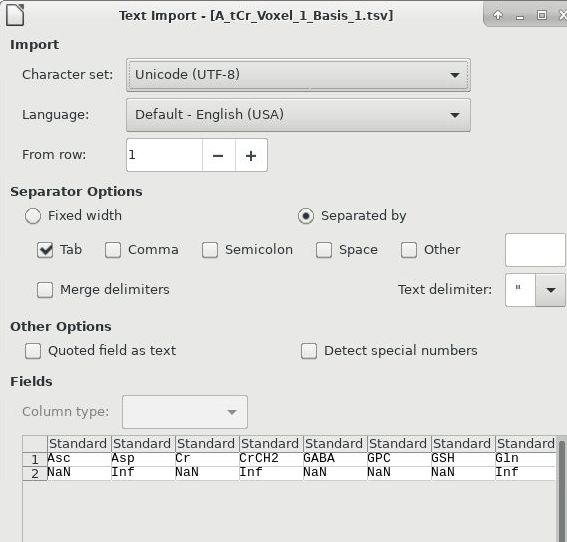
I am using the ‘Separate’ model for opts.fit.style. There are output tables in my OspreyQuantify output folder. However, some seem incomplete. The “A_tCR_Voxel_1_Basis_1.tsv” file does not contain values, whereas for other participants there are values in this table. I would also like to save the figure from the Quantify step.

These are the error messages:

Full Osprey runtime: 69.229764 seconds
Error using mvksdensity
X has no data after removing NaNs.

Error in ksdensity (line 226)
[fout,xout,u,plottype] = mvksdensity(yData,xi,varargin{:});

Error in osp_plotRaincloud (line 144)
[f_tmp, ~, ~] = ksdensity(data{1,1}, ‘bandwidth’, );

Error in osp_iniOverviewWindow (line 394)
[temp] = osp_plotRaincloud(MRSCont,MRSCont.overview.FitSpecNamesStruct.metab{gui.quant.Selected.Model}, gui.quant.Names.Quants{gui.quant.Selected.Quant},MRSCont.quantify.names.metab{gui.quant.Selected.Model}{gui.overview.Selected.Metab},‘Raincloud plot’,0,1);

Error in osp_onQuant (line 68)
osp_iniOverviewWindow(gui);

Error while evaluating UIControl Callback.

Your guidance and expertise are greatly appreciated!
–Kimberly

Could you post screens of the processed and modeled spectrum that causes this error?

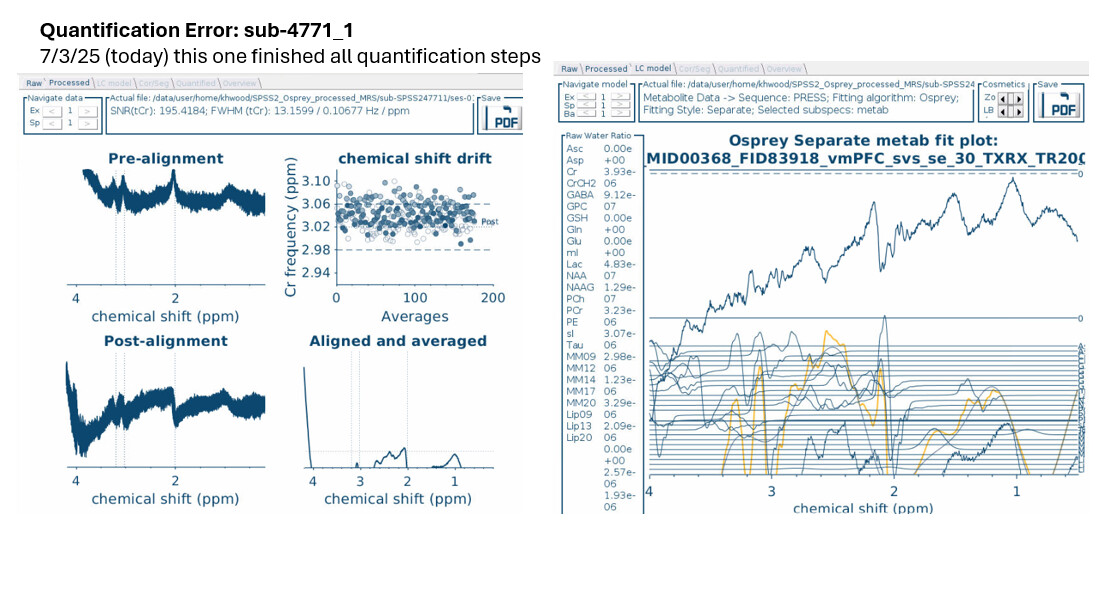
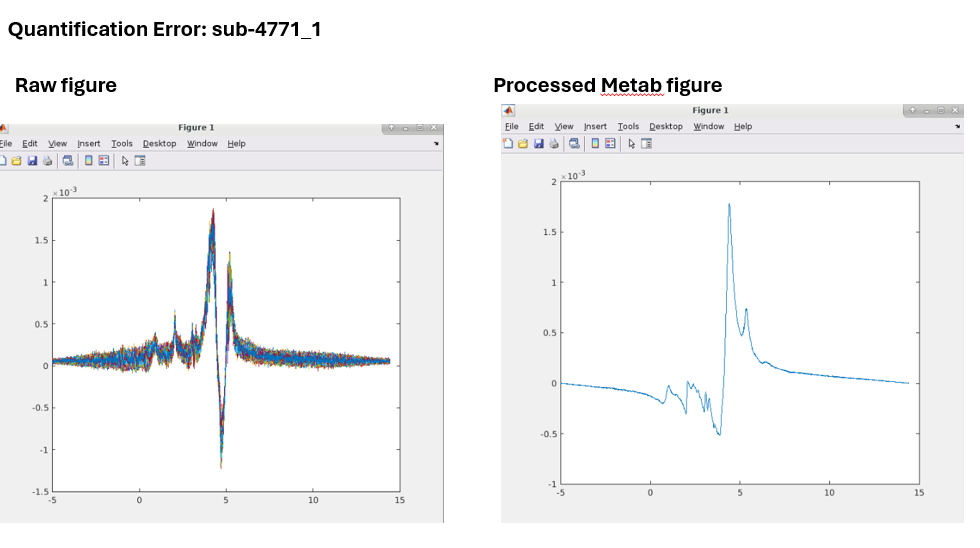
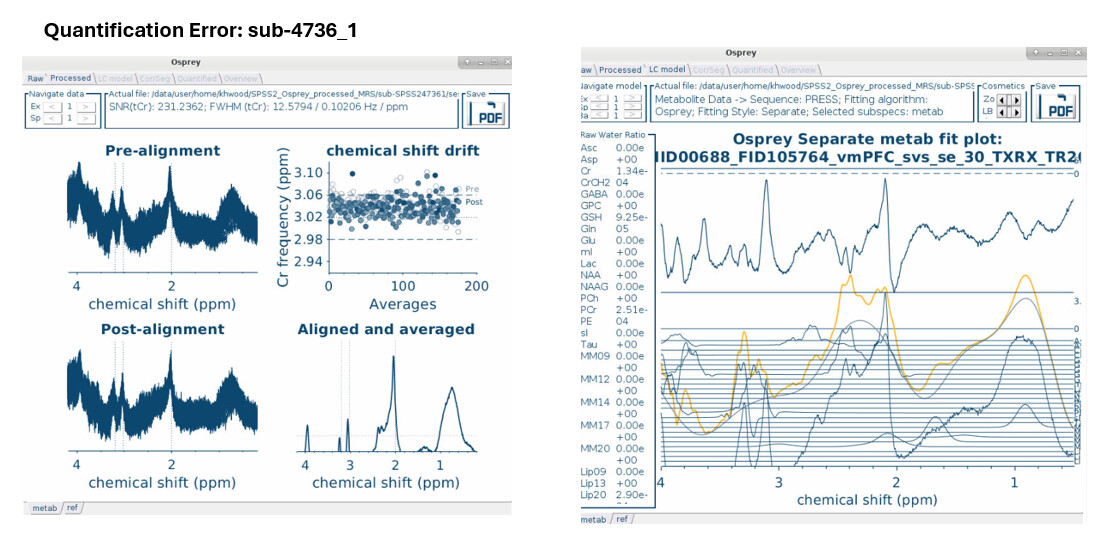
Of course, and thank you for the reply! Below are the 2 participants that were throwing the quantification error. I am still having trouble with sub-4736_1.

Thank you for your guidance and expertise!
–Kimberly

Oh dear - I’m not sure why the pre-alignment spectra are so high above the baseline. Definitely looks like something with the residual water subtraction going awry.

Can you plot the outputs of the following MATLAB commands:

plot(MRSCont.raw{kk}.ppm, real(MRSCont.raw{kk}.specs));

and

plot(MRSCont.processed.metab{kk}.ppm, real(MRSCont.processed.metab{kk}.specs));

(where MRSCont is the name of your Osprey container variable in the workspace, and where kk is the index of this particular dataset in the job file queue).

Good afternoon admin!

I realize this is not a difficult request, but I am struggling with the full file path… I am also confused because my MRSCont is named “spss2_mrs_twix_Osprey_4736_1_vmPFC_khw.mat” and I am wondering if an apostrophe is required after “.mat” to then add “.raw”…?

I’ve tried the MATLAB commands with and without an apostrophe separating the full file path but get the same error either way…

plot(/data/project/NLSB/Kimberly/SPSS2_Osprey_processed_MRS/sub-SPSS247361/derivatives_vmPFC_Osprey/spss2_mrs_twix_Osprey_4736_1_vmPFC_khw.mat.raw{/home/khwood/SPSS2_Osprey_processed_MRS/sub-SPSS247361/ses-01/mrs/sub-SPSS247361_ses-01_acq-vmPFC_press-ref/meas_MID00689_FID105765_vmPFC_svs_se_30_TXRX_NWS_TR2000.dat}.ppm, real(/data/project/NLSB/Kimberly/SPSS2_Osprey_processed_MRS/sub-SPSS247361/derivatives_vmPFC_Osprey/spss2_mrs_twix_Osprey_4736_1_vmPFC_khw.mat.raw{/home/khwood/SPSS2_Osprey_processed_MRS/sub-SPSS247361/ses-01/mrs/sub-SPSS247361_ses-01_acq-vmPFC_press-ref/meas_MID00689_FID105765_vmPFC_svs_se_30_TXRX_NWS_TR2000.dat}.specs));
?
Invalid use of operator.

plot(‘/data/project/NLSB/Kimberly/SPSS2_Osprey_processed_MRS/sub-SPSS247361/derivatives_vmPFC_Osprey/spss2_mrs_twix_Osprey_4736_1_vmPFC_khw.mat’.raw{‘/home/khwood/SPSS2_Osprey_processed_MRS/sub-SPSS247361/ses-01/mrs/sub-SPSS247361_ses-01_acq-vmPFC_press-ref/meas_MID00689_FID105765_vmPFC_svs_se_30_TXRX_NWS_TR2000.dat’}.ppm, real(‘/data/project/NLSB/Kimberly/SPSS2_Osprey_processed_MRS/sub-SPSS247361/derivatives_vmPFC_Osprey/spss2_mrs_twix_Osprey_4736_1_vmPFC_khw.mat’.raw{‘/home/khwood/SPSS2_Osprey_processed_MRS/sub-SPSS247361/ses-01/mrs/sub-SPSS247361_ses-01_acq-vmPFC_press-ref/meas_MID00689_FID105765_vmPFC_svs_se_30_TXRX_NWS_TR2000.dat’}.specs));
?
Invalid use of operator.

Am I close to setting this up correctly…or way out in left field?

Thank you greatly for your guidance and expertise!
–Kimberly

You cannot directly access the variables inside a stored .mat file. You will need to load that .mat file into the MATLAB workspace (either by double-clicking the .mat file or by entering load('name_of_file.mat') first, and then you can access the Osprey data structure (which is usually called MRSCont, but you may have named it differently when you conducted the analysis)

hmmm, this is the error I get when I load the MRSCont into the Osprey GUI:

Error using mvksdensity
X has no data after removing NaNs.

Error in ksdensity (line 226)
[fout,xout,u,plottype] = mvksdensity(yData,xi,varargin{:});

Error in osp_plotRaincloud (line 144)
[f_tmp, ~, ~] = ksdensity(data{1,1}, ‘bandwidth’, );

Error in osp_iniOverviewWindow (line 394)
[temp] = osp_plotRaincloud(MRSCont,MRSCont.overview.FitSpecNamesStruct.metab{gui.quant.Selected.Model}, gui.quant.Names.Quants{gui.quant.Selected.Quant},MRSCont.quantify.names.metab{gui.quant.Selected.Model}{gui.overview.Selected.Metab},‘Raincloud plot’,0,1);

Error in OspreyGUI (line 539)
osp_iniOverviewWindow(gui);

Error in Osprey/loadMRSCont (line 155)
OspreyGUI(gui.data.MRSCont);

Error in Osprey/onLoadMRSCont (line 177)
loadMRSCont(gui);

Error while evaluating DestroyedObject Callback.

Good afternoon!

Apologies for the delay in further trouble-shooting this issue, I was pulled away to address another project.

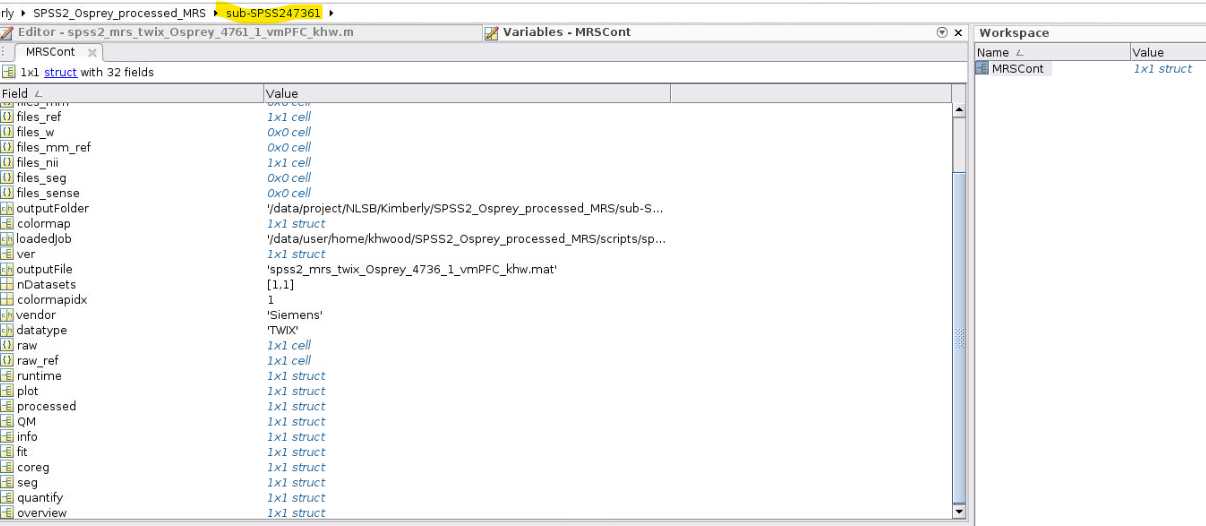
I have loaded the MRSCont in the MATLAB workspace (image below):

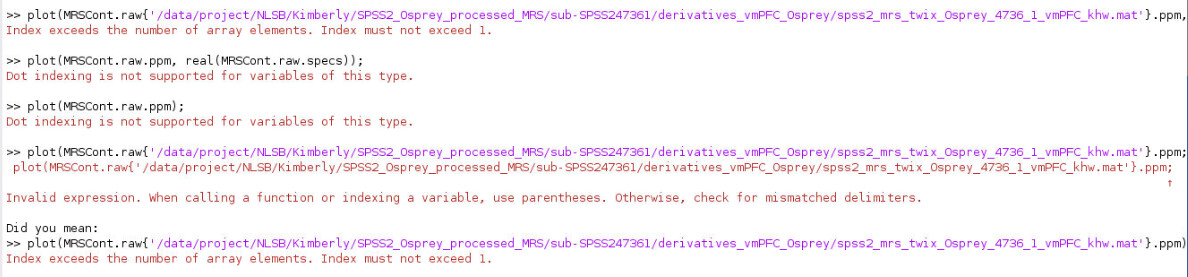
and attempted the “plot” commands a few different ways, all resulting in an error (image below):

I’m a bit confused as I do not think I have a {kk}th index for the dataset in the job file queue because each dataset was run using an individual .mat file.

Is there another way to plot the requested data?

Many thanks, and again apologies for the delay!
–Kimberly

Good morning @khwood,
just try the way that @admin has posted posted above, something like:
figure;plot(MRSCont.raw{1}.ppm,real(MRSCont.raw{1}.specs));set(gca,‘XDir’,‘reverse’);xlim([0 4.2]);
MRSCont.raw is a cell array, so you can’t access fields like ppm directly. You need to first access the cell element using curly brackets {} and then you have access to the structure in the cell array.

Best,
Heiner

Good afternoon @hraum,

Thank you greatly for the clarification!! I did the simpler version…and got the figure output to work!! Thank you again!!

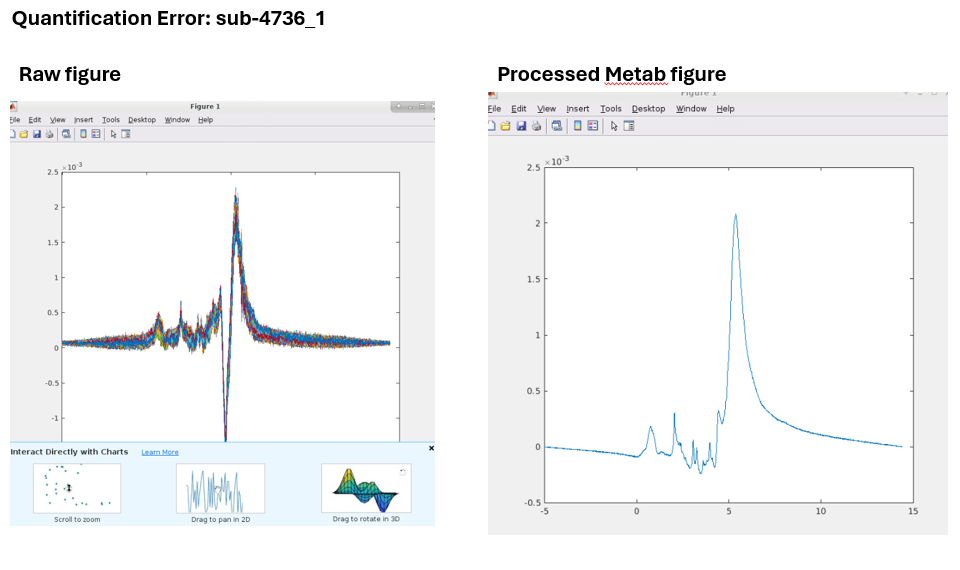
@admin, below are images for the participants with quantification errors. Any clues revealed as to next steps to salvage these participants?

Your guidance and expertise are greatly appreciated!
–Kimberly

Yikes - those are some nasty large residual water peaks where the water suppression has cut a ravine into.

So, this might be salvageable, but one would need to go into the code and do the (quite crude) pre-phasing that Osprey does when it encounters Siemens data. They typically tend to have a bit of a phase to them, so Osprey does a basic fit to the Cr/Cho singlets to pull the data straight - but that only works well if the Cr/Cho singlets don’t sit on the shoulder of a huge residual water peak.

Try commenting out this entire if-block in OspreyProcess and report back if that salvages these two datasets (it’ll definitely affect the good ones you have to, so you might want to do this on a separate container):

Best,
Georg

@admin

That worked!! Thank you greatly for the recommendation and helping to salvage these data!

Much appreciated,
–Kimberly

1 Like